360.mantisops.net · AI usage
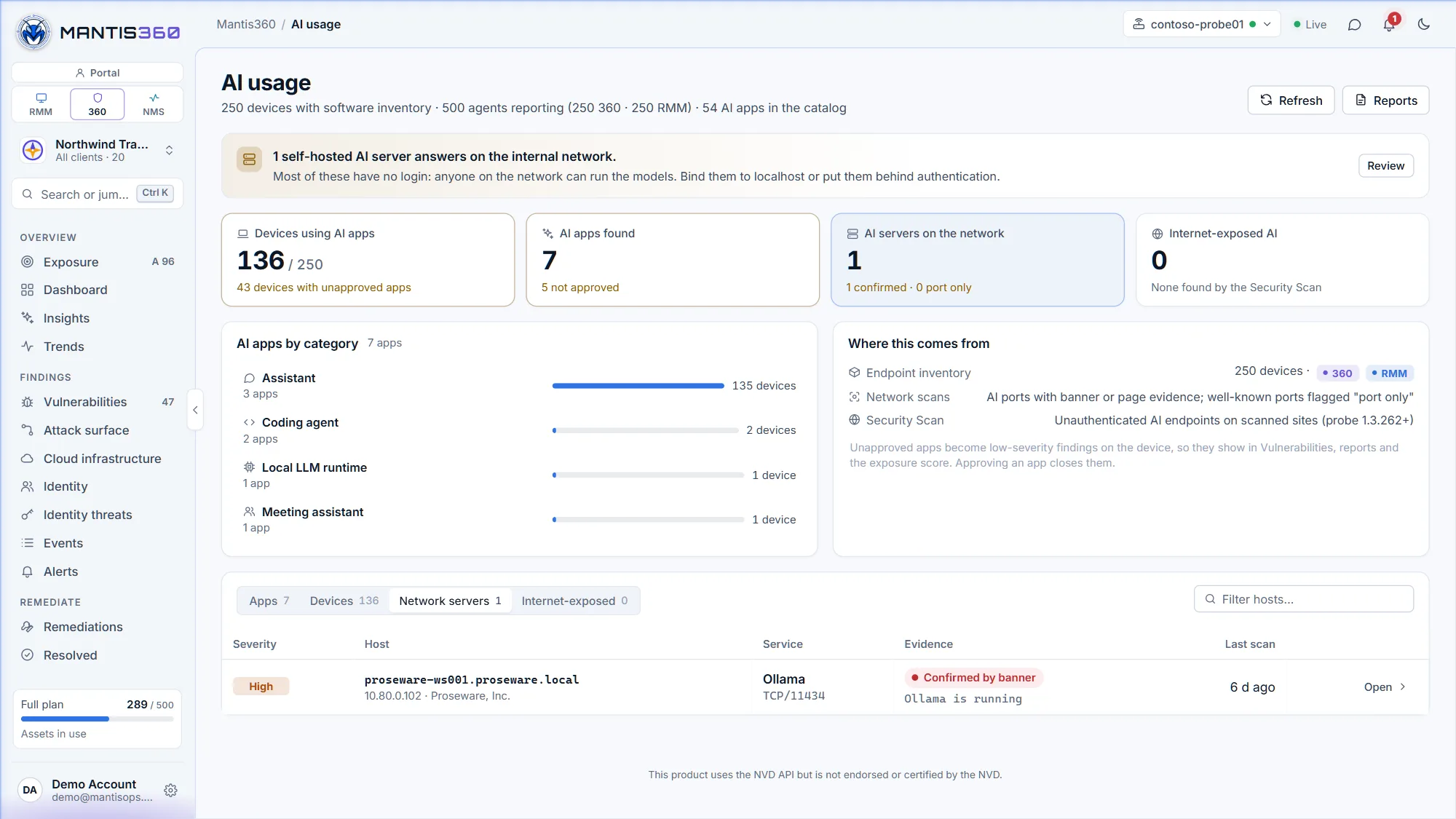
ChatGPT on the finance laptops, an AI coding agent on a developer's machine, an Ollama server on the lab network. Mantis360 finds the AI apps and AI servers in use across every client — then lets you decide which are approved.
Shadow AI isn't just a chatbot tab. It's installed apps with access to code and documents, model servers with no login, and AI services left open to the world. Mantis360 looks in all three places.
AI apps found in the software inventory the MantisOps agent reports, matched against a catalog of 50+ AI apps.
Self-hosted AI servers — Ollama, LM Studio, Open WebUI, ComfyUI, Jupyter and more — found by Mantis360 network scans.
The Security Scan flags AI services your public hosts expose without authentication, using read-only checks.
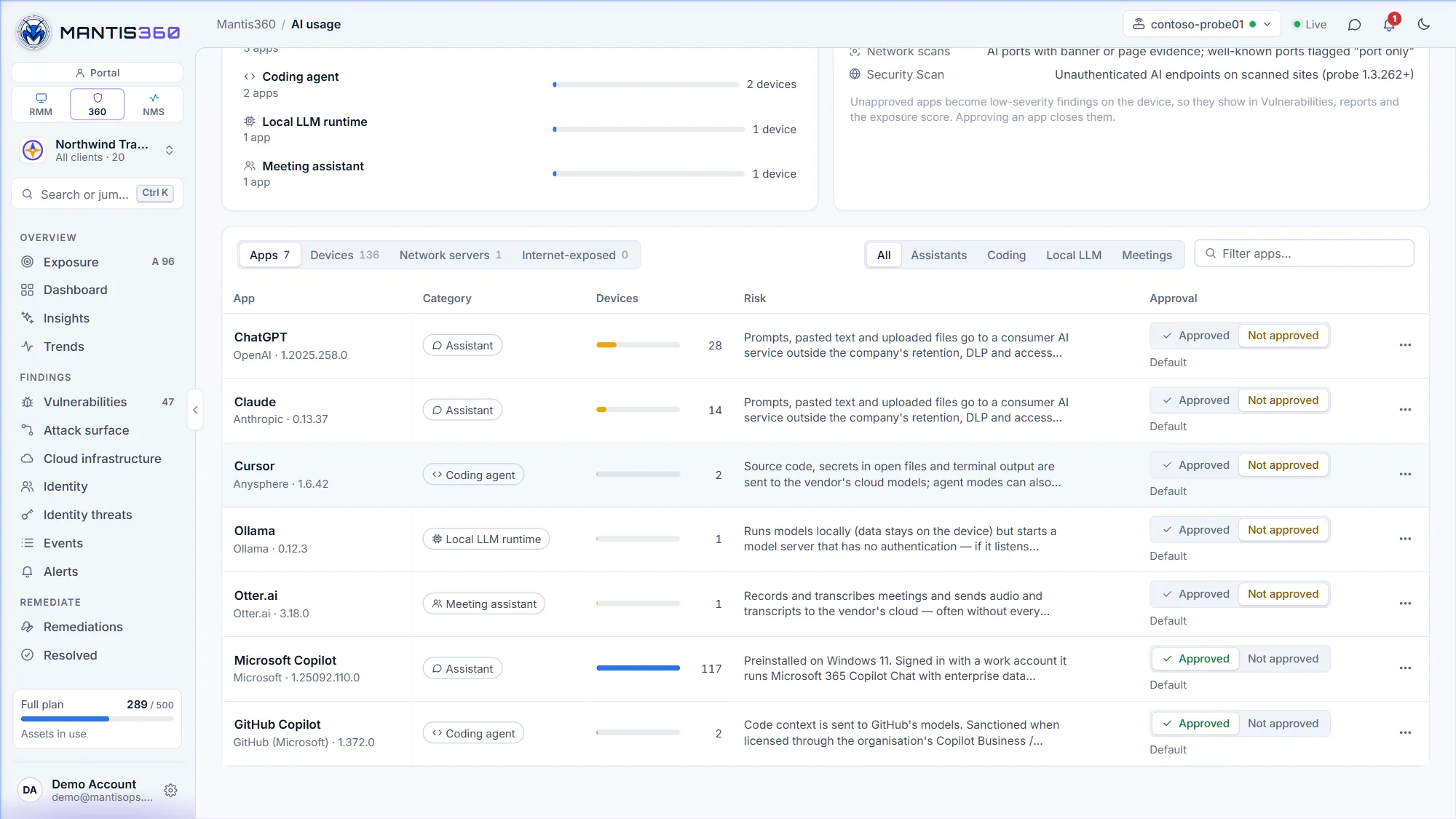
Every AI app found on your devices, with how many devices run it, why it matters, and a one-click Approved or Not approved decision.
Mantis360 compares the software inventory the MantisOps agent reports against a curated catalog of more than 50 AI apps — assistants, AI coding tools, meeting recorders, image generators and local-LLM runtimes. Matching is deliberately conservative, so an unrelated app with a similar name isn't flagged.
Every app starts with a sensible default — organization-licensed tools such as Microsoft 365 Copilot start approved, consumer services start not approved — and admins can change any of them. Unapproved AI becomes a finding on each device that runs it.
Prompts, pasted text and uploaded files go to a consumer AI service outside the company's retention, DLP and access controls.
Mantis360 network scans fingerprint the AI servers people stand up on the internal network — Ollama, LM Studio, Open WebUI, Gradio apps, ComfyUI, Jupyter and OpenAI-compatible model servers. Each is marked confirmed by its banner, or port only, so you know how sure the match is.
The website Security Scan checks your public hosts for AI services that answer the internet without authentication — an open Ollama API that lists its models is a critical finding. The checks are read-only: documented status and listing endpoints only, and no prompt is ever sent to a model.
Bind Ollama to localhost (OLLAMA_HOST=127.0.0.1) or put it behind an authenticating reverse proxy / VPN, and block port 11434 at the firewall.
A curated catalog of more than 50 AI apps, plus the self-hosted AI servers network scans look for. A sample:
Product names are trademarks of their respective owners and are used only to identify the software Mantis360 detects.
The website Security Scan that finds exposed AI services got smarter across the board.
The scan identifies the software behind a site and its version, so outdated components stand out.
Installed WordPress plugins and themes are checked against a dedicated, daily-updated WordPress vulnerability database.
Curated, daily-refreshed threat-intelligence feeds flag connections to known-bad infrastructure, such as botnet command servers and malicious certificates.
Recognises Cloudflare Access sign-in and bot-protection challenges, so a challenge page isn't graded as your site.
AI tools people use at work without IT knowing or approving them — a consumer chatbot on a finance laptop, an AI coding agent with access to source code, a meeting recorder, or a self-hosted model server someone stood up on the network.
It compares the software inventory reported by the MantisOps agent against a curated catalog of more than 50 AI apps, from assistants such as ChatGPT, Claude, Copilot and Perplexity to AI coding tools, meeting recorders, image generators and local-LLM runtimes. Matching is deliberately conservative, so an unrelated app with a similar name isn't flagged.
No. On devices it looks at installed software only. On the network it fingerprints services from scans. The internet check is read-only: it requests documented status and listing endpoints and never sends a prompt to a model.
Yes. Every app starts with a default — organization-licensed tools such as Microsoft 365 Copilot and GitHub Copilot start approved, consumer services start not approved — and admins can mark any app approved or not approved.
Each device that runs one gets a low-severity finding, so unapproved AI shows in Vulnerabilities, counts in the exposure score and appears in the AI Usage section of reports. Approving the app, or removing it from the device, closes the finding.
Mantis360 network scans fingerprint self-hosted AI servers such as Ollama, LM Studio, Open WebUI, Gradio apps, ComfyUI and Jupyter. Each is marked confirmed by its banner, or port only when just a well-known AI port answers.
No. It finds and reports AI use so you can decide what to do about it. Approving an app clears its findings; removing an unapproved app closes them on the device.
No. It's part of Mantis360, priced at $4 per asset per month, and it's in every Mantis360 and MantisOps Complete trial.
No credit card required. We review every signup and email your activation link within one business day.
Start a Mantis360 trial →Related: Mantis360 · MantisOps Complete · Tenable alternative · Pricing